
03 — DialX
Every call, inbound and outbound, on one dialer.
DialX brings inbound queues, outbound campaigns and manual calls into one screen for your agents, with smart dialling, live monitoring and every outcome captured where your team can see it.

The challenge
Calling teams lose time between the calls.
When inbound and outbound calling live in different tools, agents dial by hand and supervisors piece together what happened from spreadsheets, a lot of the working day goes into waiting, switching and chasing rather than talking to customers.
- Agents spend minutes dialling and listening to unanswered rings.
- Inbound lines and outbound campaigns run on separate systems.
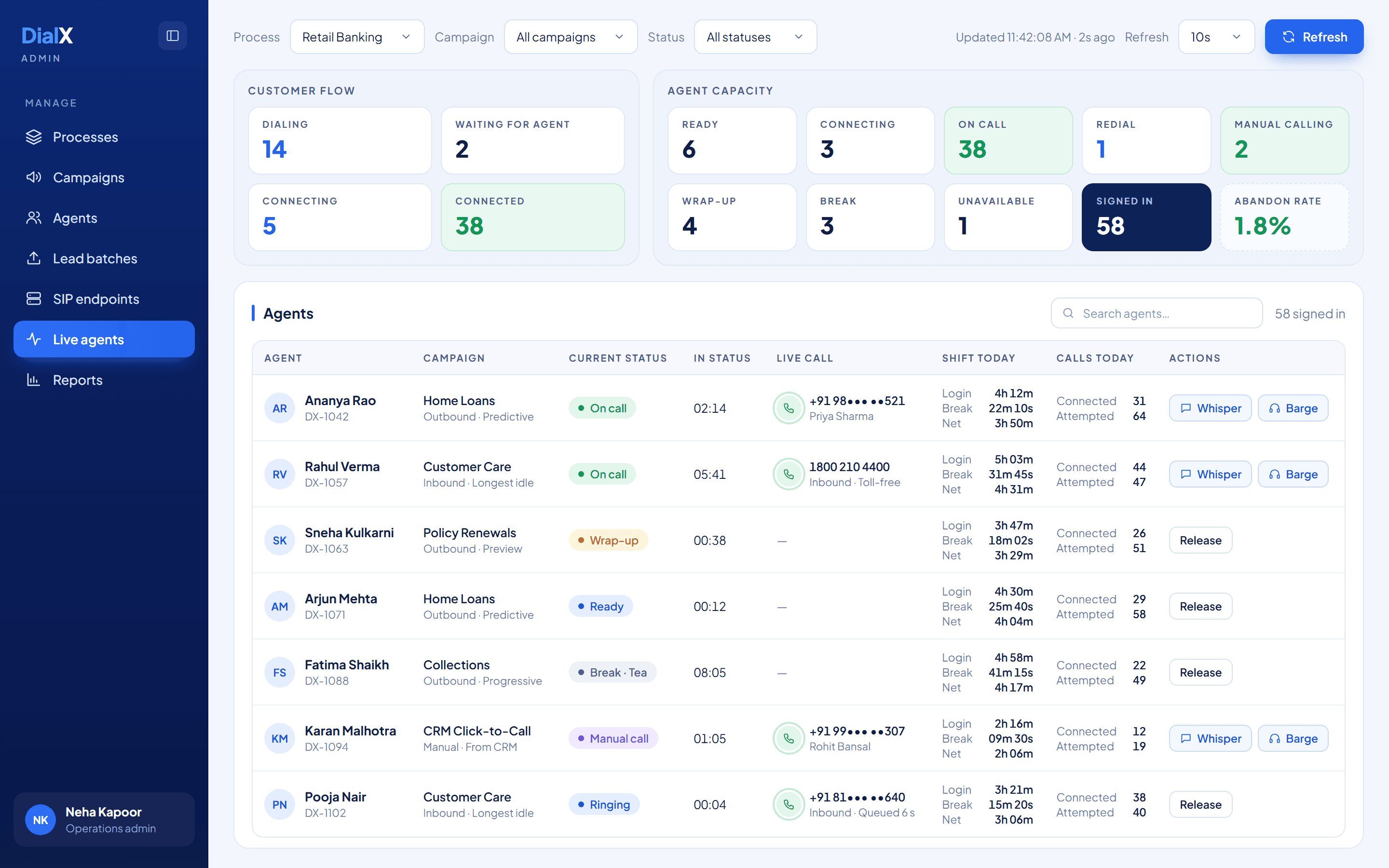
- Supervisors can't see who is on a call, on a break or idle right now.
- Unanswered numbers and promised callbacks slip through the cracks.
Inside DialX
The floor, the campaign and the call, each on one screen.
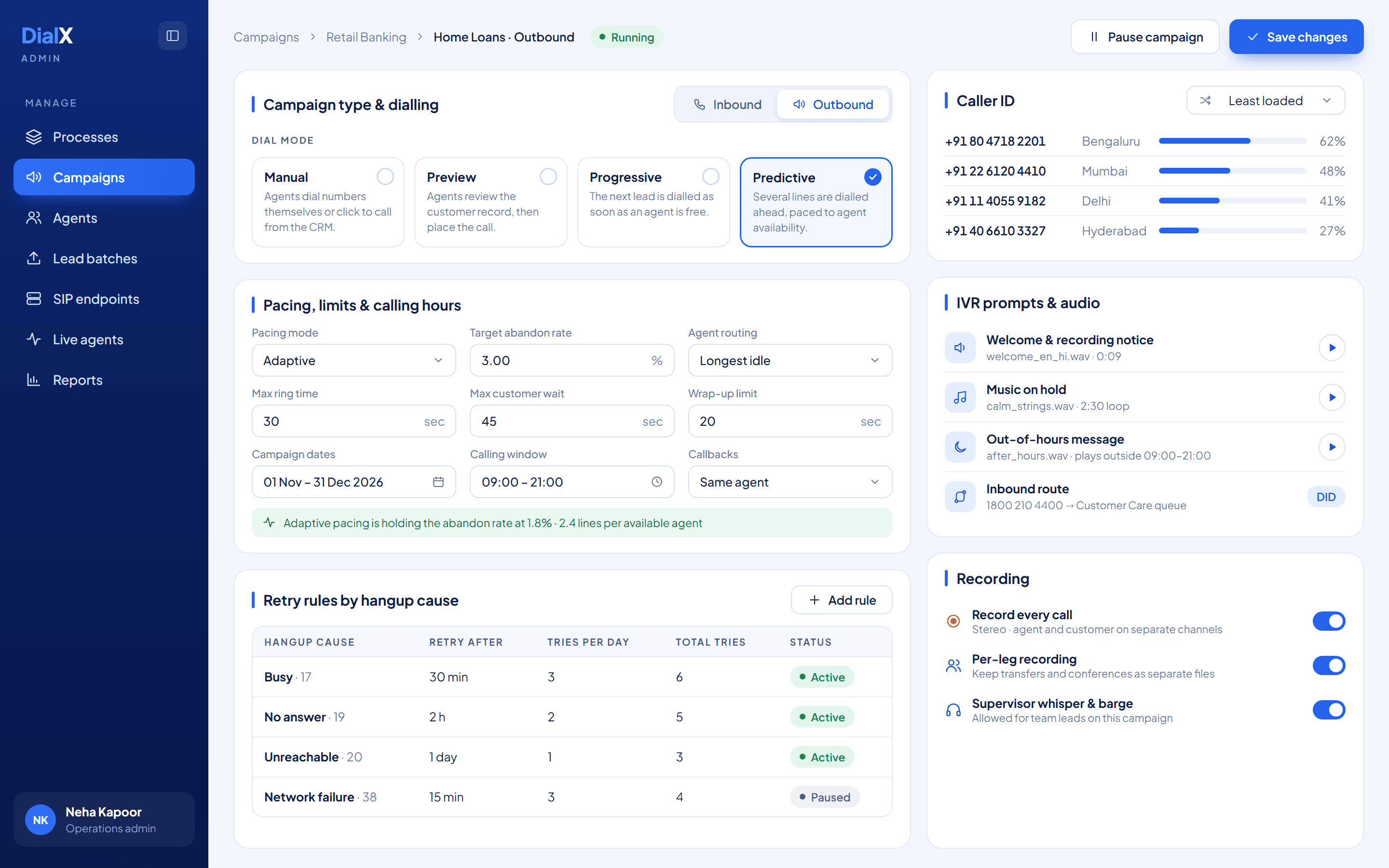
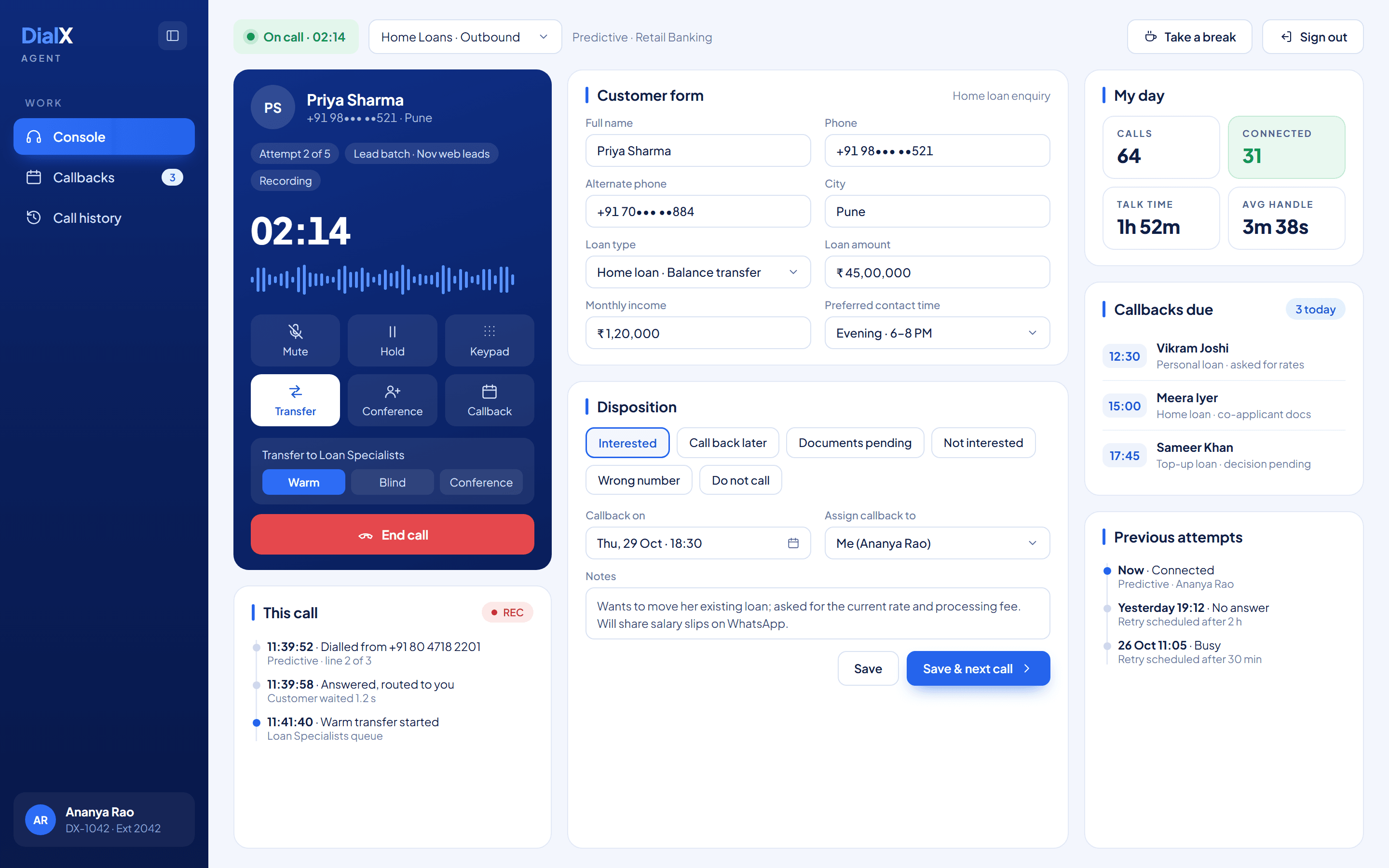
Supervisors watch every agent and call live, admins set up dialling, caller ID, IVR prompts and retries per campaign, and agents handle the call, the customer form and the outcome without switching tabs.
Capabilities
Everything a calling team needs, in one dialer.
From the first ring to the final disposition, DialX covers inbound and outbound calling, the agent's screen and the supervisor's view of the floor.
Inbound calling
Route toll-free and local numbers to the right campaign, hold callers with music and connect them to the best available agent.
- Number-to-campaign routing
- Longest idle, fewest calls or skill routing
- Ring and wait-time limits
Outbound campaigns
Run calling campaigns on your lead lists, with campaign dates, calling hours and the right caller ID for every call.
- Leads from CSV, Excel or API
- Caller ID rotation across numbers
- Start, pause or stop lead batches
Four dial modes
Choose how each campaign dials, from fully manual to predictive, with pacing that adapts to how many agents are free.
- Manual and click-to-call
- Preview before dialling
- Progressive and predictive dialling
IVR prompts & routing
Greet callers in your own voice, tell them the call is recorded and handle calls that arrive outside working hours.
- Welcome and recording notices
- Music on hold
- Out-of-hours messages
Call controls
Everything an agent needs on a live call, without leaving the screen they are already working in.
- Hold, mute and keypad
- Warm and blind transfer
- Conference and add a party
Live monitoring
See every agent and every call as it happens, and step in when a conversation needs a supervisor.
- Real-time agent and call board
- Whisper and barge-in
- Release agents remotely
Customer forms & dispositions
Show agents the right form for each process and capture the outcome of every call on the same screen.
- Custom fields per process
- Your own disposition list
- Notes on every call
Retries & callbacks
Bring unanswered numbers back at the right time, and keep promised callbacks with the agent who made them.
- Retry rules by hangup cause
- Scheduled callbacks
- Same-agent callbacks
Recording & reports
Record calls, follow agent time across the shift and review campaign results, with an audit trail of changes.
- Mono or stereo recording
- Login, break and talk-time reports
- Audit logs
Dial modes
The right way to dial for every campaign.
Each campaign picks its own mode. Move a campaign from preview to predictive as the list grows, without changing tools or retraining agents.
Inbound
Calls to your numbers are greeted, queued with music on hold and routed to the best available agent.
Best for: Helplines, support and order lines
Manual
Agents dial a number themselves, redial or click to call from your CRM.
Best for: Account managers and one-off follow-ups
Preview
The agent reads the customer record first, then places the call when ready.
Best for: High-value or complex conversations
Progressive
The next number is dialled automatically the moment an agent becomes free.
Best for: Steady campaigns, collections and renewals
Predictive
Several numbers are dialled ahead, paced to keep abandoned calls under your target.
Best for: Large lead lists and sales teams
Example workflow
From a lead list to a recorded outcome.
A typical outbound campaign in DialX. Inbound calls follow the same path from the moment they reach an agent.
- Step 1
Load your leads
Upload a CSV or Excel file, or push leads in through the API, and attach them to a campaign.
- Step 2
Dial at the right pace
DialX dials in the mode you chose and paces calls to the agents who are free.
- Step 3
Talk with full context
The agent sees the customer form and past attempts, and can hold, transfer or conference.
- Step 4
Capture the outcome
A disposition, notes and any callback are saved; unanswered numbers follow your retry rules.
Use cases
Where it can help.
Typical situations to explore together. We confirm the right fit for your operation during scoping.
Sales & lead conversion
Call fresh leads quickly with predictive or progressive dialling, and keep every follow-up on schedule.
Customer support lines
Answer toll-free and local numbers with recorded greetings, queues and routing to the right team.
Collections & renewals
Work through large lists with retry rules and callbacks, so no account is forgotten.
Click-to-call from your CRM
Let agents place calls from the system they already use, with outcomes flowing back into DialX.
FAQ
Questions teams often ask.
Common questions about DialX. If yours isn't here, we're happy to talk it through.
Yes. Each campaign is set up as inbound or outbound, and agents can be assigned to more than one campaign. Supervisors see both kinds of calls on the same live board.
Manual lets agents dial themselves or click to call. Preview shows the customer record first, then the agent places the call. Progressive dials the next number as soon as an agent is free. Predictive dials ahead of agents and adjusts its pace to keep abandoned calls under the target you set.
DialX plays your welcome and call-recording notices, music on hold and out-of-hours messages, and routes each inbound number to the right campaign. If you need multi-level IVR menus, we scope them with you during setup.
Upload a CSV or Excel file, add leads through the API or enter them by hand. Inbound callers are captured automatically. Lead batches can be started, paused and stopped per campaign.
DialX connects to your SIP trunks and phone numbers, and agents can click to call from your CRM. We review your telephony provider, numbers and CRM during scoping before anything goes live.
Calls can be recorded in mono or stereo, with agent and customer on separate channels, and transfers or conferences can be kept as separate recordings. Recording rules are set per campaign.
Explore DialX for your team.
Share your workflows and requirements, and we'll walk you through how it could fit your operation.